iPhone · App Store
Food Scanner
Food Scanner is an iPhone app with optional wearable companion support. It also works standalone on iPhone.

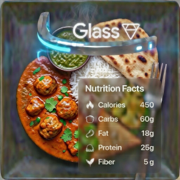
The app turns a food photo into an AI-assisted nutrition overlay with estimated calories, macros, and concise pros and cons. Users can capture from the iPhone camera, choose a photo from the library, or send an image from the optional wearable companion.
Supported Modes and Models
- Local iPhone Vision (default, on device)
- xAI Grok
- OpenAI
- Anthropic Claude
- Google Gemini / Gemma
- Ollama vision models
- PocketPal
- Custom OpenAI-compatible endpoints
Optional Wearable Companion (Google Glass XE)
The optional Google Glass XE companion captures a food image and sends it to the iPhone app over local Wi-Fi or iPhone Personal Hotspot. Analysis runs on iPhone, and results are displayed back on the companion display.
Requires: Google Glass XE, ADB on a computer, and an iPhone Personal Hotspot. Connect Glass to the iPhone hotspot before opening Food Scanner.
Install the optional companion
- Download the companion APK from the button below (or from the GitHub release).
- Follow the Google Glass XE installation guide on GitHub for ADB install, USB debugging, and hotspot setup.
- Open this iPhone app and confirm the connection indicator.
- On Glass, open the scan food command and tap the touchpad to launch. Wait about one second, then tap again to capture a food photo.
Do not rely on saying “Ok Glass.” Use the touchpad tap on the scan food Glass command.
Download Google Glass companion (APK) Installation guide on GitHub
Notes
- Nutrition values are AI estimates for general information only.
- The app is not medical advice and should not be used for diagnosis or treatment.